Temperature vs Radii of a Halo - Direct Search
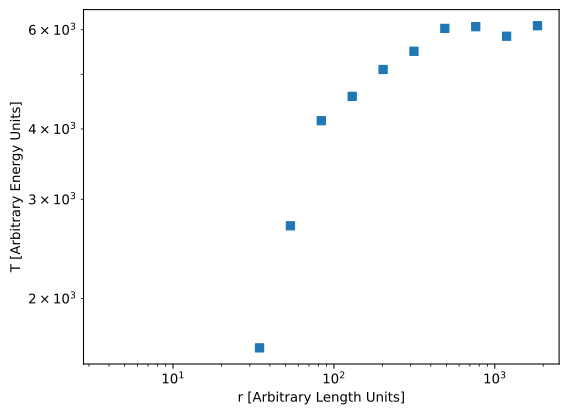
In this recipe, we'll be retrieving the temperature of the gas particles in a halo in an IllustrisTNG dataset and plotting them as a function of radius.
We'll do this using search indices directly here; for a similar recipe where we use Search Objects, see Temperature vs Radii of a Halo - Search Objects.
Snapshot information
We will be using
snapshot_090.hdf5
(about \(10^7\) particles, 2.5 GB) from one of the IllustrisTNG runs used in the
CAMELS project for this
recipe. The halo information we're using is obtained from the groups_090.hdf5
file at the same location.
Since this is simply for demonstration purposes, we'll look at the most massive halo in the box (ID: 0). This halo has a center of mass at \((18271, 5533, 5246)\) and a \(R_{c,200}\) of \(745\). (We'll assume arbitrary units, round values and a spherical halo).
Import packages
Load Temperatures
Temperature isn't directly stored. Instead, we use
$$
\gamma = \frac{5}{3}, \qquad x_H = 0.76,
$$
$$
\mu = \frac{4}{1 + 3 x_H + 4 x_H a_e} ,
$$
$$
T = \mu (\gamma-1) U,
$$
assuming \(m_p=k_B=1\), \(a_e\) is the electron abundance (as
PartType0/ElectronAbundance) and \(U\) is the internal energy
(as PartType0/InternalEnergy).
Load Dataset
dataset = packingcubes.GadgetishHDF5Dataset(
    filepath="snapshot_090.hdf5",
    particle_type="PartType0",
)
Cube
Create Temperatures data
From above, we need the extra fields ElectronAbundance and InternalEnergy.
Compute temperature:
Add temperature to dataset:
- We need to specify that T is already sorted since \(\mu\) and \(U\) are
Note
We could have also done this calculation after the search, using subindices
of e_abun and u, but this is just as easy, and this way we can easily get
the temperature of particles in other regions.
Get Halo Particle Temperature and Radii
Extract the temperature of all particles in our halo1.
Create Sphere
Define our search region as the sphere enclosing the halo:
Search
chunks = cubes.get_particle_indices_in_sphere(center, radius)

num_found = np.sum(chunks[:,1]-chunks[:,0])
Get Radii/Temperature
Get positions from chunk
positions = np.empty_like(dataset.positions, shape=(num_found, 3))

offset = 0
for chunk in chunks:
    size = chunk[1] - chunk[0]
    positions[offset:offset + size, :] = dataset.positions[chunk[0]:chunk[1], :]
    offset += size
Compute radii
Get Temperatures
T = np.empty_like(dataset.T, shape=(num_found, )) # (1)!

offset = 0
for chunk in chunks:
    size = chunk[1] - chunk[0]
    T[offset:offset + size] = dataset.T[chunk[0]:chunk[1]]
    offset += size
- Note that we're overwriting our
Tdefinition from earlier, since we've attached it to the dataset.
Plot
The following is a quick and dirty method for computing the average temperature per radial bin and is not really part of the recipe. Consider using a more robust method.
logradii = np.log10(radii)
num_bins = 15
bins = np.histogram_bin_edges(logradii, bins=num_bins)
bindices = np.digitize(logradii, bins=bins)
Tbins = np.empty_like(T, shape=(num_bins,))

for i in range(num_bins):
    match = T[bindices==i]
    Tbins[i] = np.mean(match) if match.size>100 else 0

bin_centers = 10**(bins[:-1] + np.diff(bins)/2)

plt.loglog(bin_centers, Tbins, 's')
plt.xlabel("r [Arbitrary Length Units]")
plt.ylabel("T [Arbitrary Energy Units]")
plt.savefig("figures/TVR_direct.svg", bbox_inches="tight")
-
Technically, this will include particles in subhalos and unbound particles. But that's totally fine for this plot. ↩