Benchmarking packingcubes
Setup
We use the code in benchmarks/performance to run our benchmarks. It's similar
in functionality to the timeit module (which it was based on), with further
customization.
For each search object, we construct a dataset of size \(n\) with random data and pass it to the creation method. Psuedocode:
dataset = InMemory(positions=random_positions)
for name, creation_method in creation_dict.items():
    search_objects[name], bench[name] = benchmark(
        creation_method,
        dataset.copy()
    )
packingcubes versions actually sort the data, we reset the dataset
before each timing run. This is excluded from the results.
We then generate a number of random spheres (10 for now) that overlap the dataset (they do not need to be entirely contained). These are our "search balls" and we set their radii such that \(\sim m\) particles are contained:
for i in range(10):
    centers[i] = random_point_in_dataset(dataset)
    radii[i], actual_numbers[i] = smallest_radii_containing_points(dataset, center, m)
Finally, for every search method, we average the time taken to search over all search balls:
for name, (so_name, search_method) in search_dict.items():
    search_results, bench[name] = benchmark(
        search_objects[so_name].search_method,
        (centers, radii)
    )
    if can_verify(search_method):
        verify_search(search_results, actual_numbers)
query type methods, except we use 100 particles.
For some of the search methods (anywhere a strict search is available), we verify that we return the correct number of particles as well.
We benchmark across the following dataset sizes and search ball sizes:
| \(m \\ n\) | \(10^{4}\) | \(10^{5}\) | \(10^{6}\) | \(10^{7}\) | \(10^{8}\) |
|---|---|---|---|---|---|
| \(10^{3}\) | ☑ | ☑ | ☑ | ☑ | ☑ |
| \(10^{4}\) | ☑1 | ☑ | ☑ | ☑ | ☑ |
| \(10^{5}\) | ☑1 | ☑1 | ☑ | ☑ | ☑ |
We benchmark the following functions:
-
Creation
Search Object (Library) PackedTree Cubes OpTree KDTree (SciPy) -
Search
Name Search Object Function/Method packed-search PackedTree get_particle_indices_in_spherepackli-search2 PackedTree get_particle_index_list_in_spherepacknumb-search2 PackedTree get_particle_indices_in_sphere3cubes-search2 ParticleCubes get_particle_indices_in_spherecubeli-search ParticleCubes get_particle_index_list_in_sphereoptree-search OpTree query_ball_pointkdtree-search4 KDTree query_ball_point -
Query
Name5 Search Object Function/Method packed2 PackedTree get_closest_particlespacked (jitted) PackedTree get_closest_particles3optree Optree querykdtree KDTree query
Finally, we show results across 3 different machines:
| Name | Details |
|---|---|
| Laptop | 8-core laptop, used for development |
| Stampede3 | 80 cores per node, NVDIMM partition on the TACC Stampede3 cluster (link) |
| CI | 4-core VM. The ubuntu-latest runner on GitHub (link) |
Results
Raw Timing
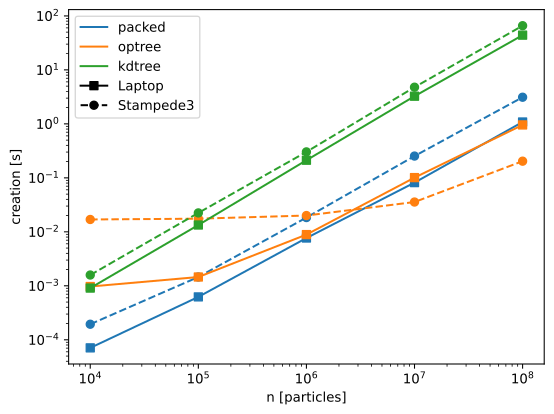
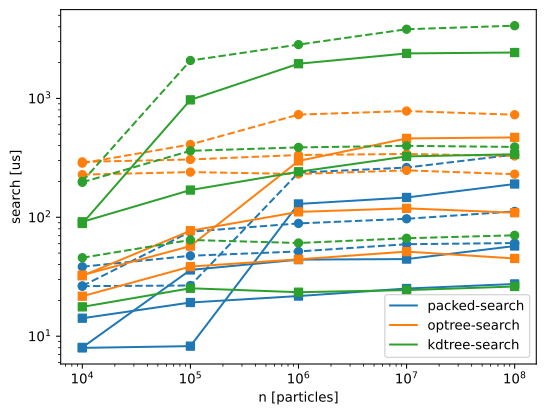
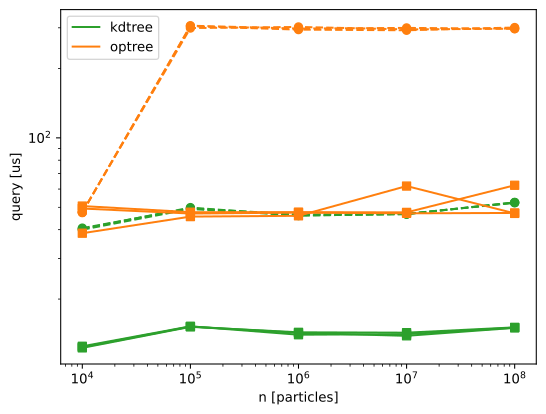
Here we show the raw timing results. For all benchmarks, we do an untimed trial run first, to sort out any precompiling/warmup.
-
Creation
-
Search
-
Query
Expected Scaling
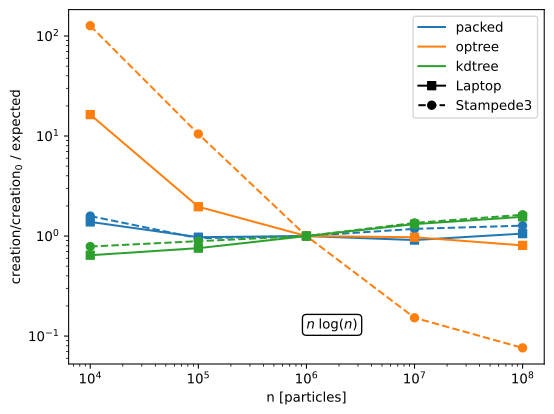
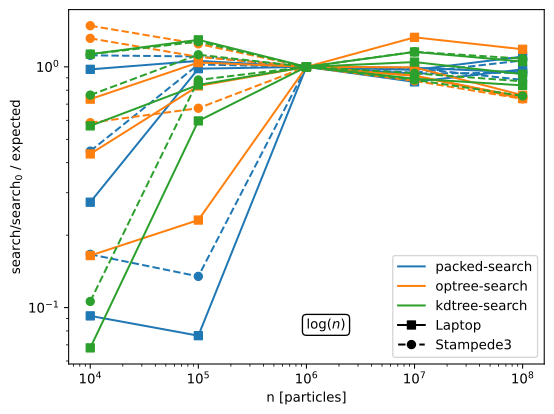
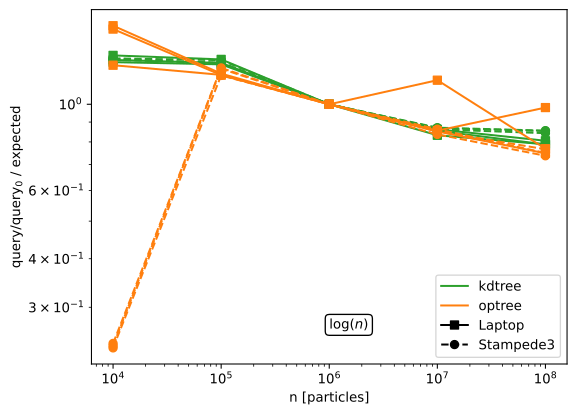
Here we show the timing for the various tasks divided by the expected growth rate, normalized at \(n=10^6\).
Consider, for example, tree creation, which involves (and is dominated by) a
sorting of the data. Sorting is classically an \(O(n\log n)\) process, and, if
we normalize and divide out \(n\log n\), we would expect a flat line. We can see
this behavior in the first panel for the PackedTree. The KDTree does a
little worse than \(n \log n\) (the slight upwards trend); Cubes does slightly better6.
-
Creation
-
Search
-
Query
VS SciPy
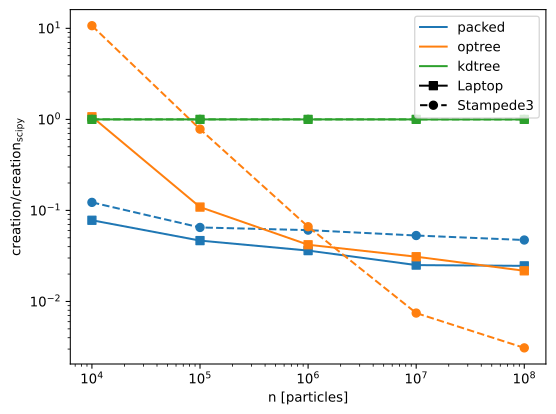
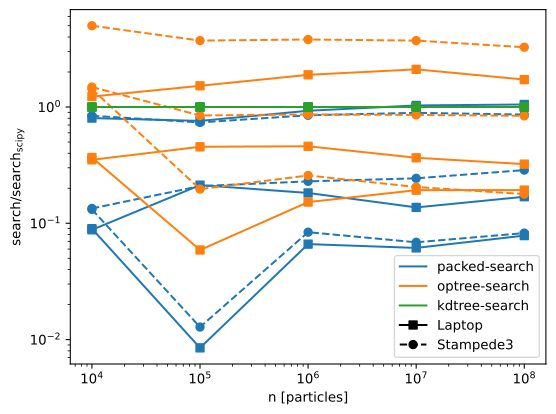
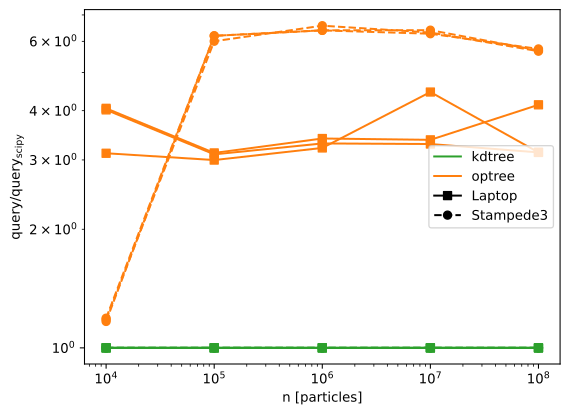
Here we normalize to the SciPy results from KDTree.
-
Creation
-
Search
-
Query
Latest CI Run
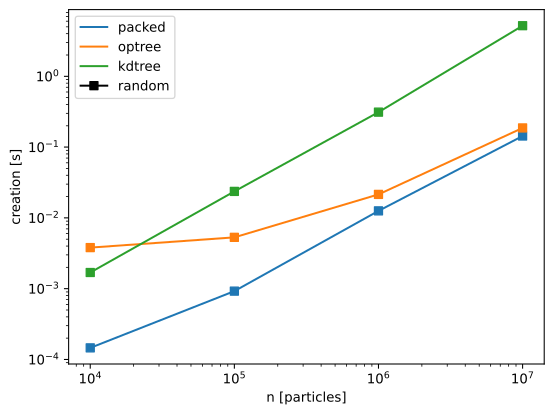
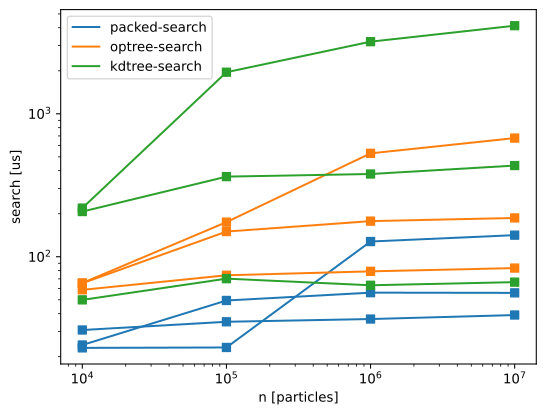
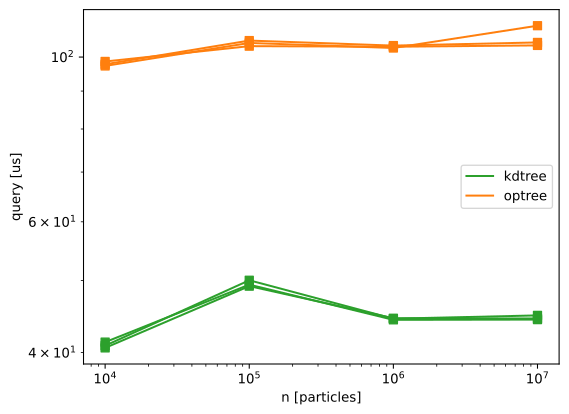
In the following images, we show the latest CI run only, highlighting the most up-to-date performance:
-
Creation times
-
Search times
-
Query times
-
For these cases, the search result should include the entire dataset. This is trivially easy to do with
PackedTrees(it's effectively justnp.arange(len(ds))). It's slightly more complicated forParticleCubes, since you need to append multiple cubes, but there's still no tree traversal. This explains the extremely small results for those cases. ↩↩↩ -
Used in comparison benchmarking only ↩
-
Names in caption. Actual option names are generally name + 'q', e.g.
--packq-searchor--packnumbq-search. Use the help option (-hor--helpfor more. ↩ -
This is much more likely due more to the normalization and/or parallelization then because we've achieved an improvement over general search. ↩